
The fastest way to handle a rush isn’t always to add kitchen capacity. Pizzeria back-of-house workflow optimization for high order volume starts by reducing friction: align menu choices and customizations with what the kitchen can produce, then coordinate ordering systems and station workflows so tickets move smoothly. The right approach depends on where orders slow down and what your team needs to keep quality consistent.
Speed matters when orders stack up, but it won’t fix bottlenecks caused by complex tickets, competing order channels, or poorly arranged prep and cooking stations. This guide compares practical approaches to menu simplification, customization controls, order management, staffing coordination, and kitchen layout. You’ll see where each can help, what trade-offs to consider, and how to choose a workflow that supports more guests without making service harder for your team.
Key Takeaways
- Use sales patterns and ingredient tracking to identify menu items that complicate prep or create avoidable waste.
- Set clear customization rules and repeatable prep standards so special requests remain manageable during a rush.
- Route orders from in-person and digital channels into a kitchen flow that makes priorities and ticket status easy to see.
- Coordinate front-of-house decisions with kitchen capacity to keep incoming orders moving without overwhelming production.
- When equipment limits are slowing throughput, compare commercial oven and mixer options, including XLT and EDGE Pizza Ovens, Conveyor Ovens, and Hobart Mixers.
Menu simplification and ingredient inventory
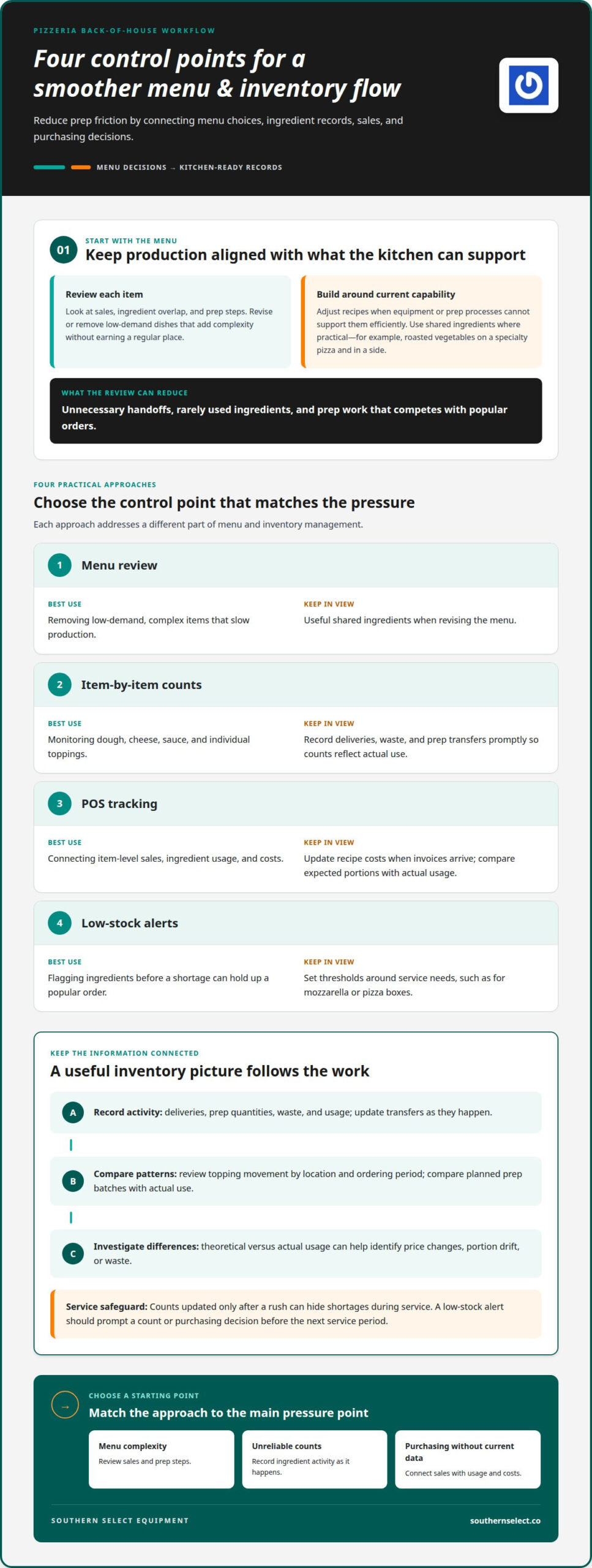
A shorter, more focused menu can make a busy pizza line easier to stock and run. Review each item’s sales, ingredient overlap, and prep steps. A specialty pizza that uses unique toppings and requires separate prep may add complexity without earning a regular place. Removing or revising underperforming dishes can reduce handoffs and help the team focus on popular orders.
Match menu choices to the kitchen’s actual capabilities. If a dish requires equipment or a prep process the operation can’t support efficiently, adjust the recipe or offer it only when it fits existing production. Build recipes around ingredients already in stock where practical. For example, use the same roasted vegetables on a specialty pizza and in a side, rather than adding a rarely used ingredient that takes up storage.
Track ingredients item by item, including dough, cheese, sauce, and toppings. Record deliveries, prep quantities, waste, and usage so inventory reflects what the kitchen can actually use. Compare topping movement by location and ordering period; one pizzeria may need different purchasing quantities for pepperoni than for vegetables. Track dough and prep batches too, then compare planned quantities with actual use to spot recurring overproduction.
Set a low-stock threshold for ingredients that can hold up a popular order, such as mozzarella or pizza boxes. When counts approach that point, an alert should prompt a count or purchasing decision before the next service period. Real-time inventory works best when staff record deliveries, waste, and prep transfers as they happen. Counts updated only after a rush can hide shortages during service.
POS data can connect sales with inventory and cost tracking. Use item-level sales to see which menu choices move, then compare ingredient use with recipe portions. Keep recipe costs current as invoices arrive, and review theoretical versus actual usage to identify price changes, portion drift, or waste. Include labor and paper goods in the management picture where the POS supports those records.
| Approach | Best use | Watch for |
|---|---|---|
| Menu review | Removing low-demand, complex items | Keep useful shared ingredients in view |
| Item-by-item counts | Monitoring key ingredients | Record waste and transfers promptly |
| POS tracking | Connecting sales, usage, and costs | Update recipes when invoices arrive |
| Low-stock alerts | Flagging ingredients before shortages | Set thresholds around service needs |
Choose the approach that addresses the main pressure point: menu complexity, unreliable counts, or purchasing decisions made without current sales and usage data.
- Review sales and prep steps to identify menu items that slow production.
- Use shared ingredients and location-specific topping patterns to guide purchasing.
- Update inventory as deliveries, waste, and prep transfers occur.
- Compare recipe expectations with actual use to investigate cost and waste changes.
Handling complex pizza orders and customizations
A half-and-half pizza can mean two topping combinations, separate finishing instructions, and more chances for a remake. Map how each customization moves through the shop, from order entry to topping, baking, cutting, and boxing. This reveals whether complexity comes from the recipe, unclear instructions, or a station handoff. Back-of-house optimization starts with making that handoff predictable, not asking cooks to memorize every customer request.
In the United States, pizzeria prep, holding, and cooling must follow the food-safety requirements that apply to the location. Core controls include monitoring time and temperature, separating raw ingredients from ready-to-eat foods, and documenting handling. Specific limits depend on applicable requirements.
Use modifier prompts to collect details in a consistent order. For a custom pizza, prompts might ask for size, crust, sauce, cheese, toppings, and special instructions. High-volume operations like Manny & Olga’s Pizza, which manage diverse menus featuring everything from jumbo slices to dietary crusts, rely on structured prompts to keep tickets accurate. Make choices explicit, such as “light sauce” or “no cheese,” rather than relying on free-text notes. Add rules that prevent contradictory combinations or flag a request for staff review. Clear prompts reduce back-and-forth and help the kitchen distinguish a preference from an allergy-related instruction.
Set a house rule for what the kitchen can execute during a rush. For example, specify which toppings can be added or removed, which substitutions need an approved recipe, and which requests require manager review. Include the rule in training and the order workflow. Restaurants can also flag unusual tickets with a clear station cue, so the person cutting or boxing sees the instruction before the pizza leaves the line.
When choosing POS software for a pizza restaurant, focus on how it handles modifiers, not simply how many features it lists. Test an order with a half-and-half pie, extra cheese, and a special instruction. Check whether the ticket displays each choice clearly, records the correct item, and sends the same details to the kitchen display. If staff must translate shorthand or re-enter notes, the setup adds work at the busiest point.
Pizza back-office software can connect recipe settings, order records, and operational reports. Use it to identify frequent customizations, review remake reasons, and determine whether a modifier needs a clearer prompt or standard recipe. Keep changes coordinated: update the POS, kitchen display, and training materials together. That prevents one station from following a new rule while another still uses an outdated ticket format.
Before service, walk through a test ticket with the order taker, topping station, oven tender, and packer. Confirm that each person can find the customer’s choices without asking the previous station. If complex orders repeatedly pause at one handoff, adjust that prompt or station cue first. This gives the team a practical way to improve accuracy while keeping customization available to guests.
Order flow across POS, online ordering, and kitchen displays
A clear order path connects the POS, online orders, and kitchen stations without repeated entry. Compare each option by how well it preserves order details, shows production status, and helps staff spot delays.
POS-to-Kitchen Order Flow
A POS-to-kitchen display system sends an order from the cashier or online channel to a production screen. Unlike paper tickets, a display can keep incoming orders visible and let staff update their status as work progresses. Map the handoff: enter the order, confirm its items and instructions, route it to the kitchen, then mark stages such as started and ready. A test order can reveal missing modifiers or unclear wording.
Kitchen Throughput and Bottleneck Visibility
Throughput visibility shows where tickets collect, such as the make line, oven, or boxing station. It differs from order routing, whose main purpose is to decide which station receives each item. Review display statuses and ticket age during service; a growing oven queue points to a different constraint than orders waiting for toppings. Use reports to compare patterns across shifts and adjust station assignments.
Time-Sensitive Kitchen Workflows
Time-sensitive workflows make due times and order priorities easy to distinguish. For example, time a scheduled pickup toward its promised collection, while allowing enough production time to pack and hand off a delivery order. This differs from general throughput tracking because it organizes work around readiness, not simply the order tickets arrived. Give staff a consistent way to flag priority orders, then review whether the kitchen started them at the right point.
Ticket Routing to Prep Stations
Ticket routing directs each item or task to the responsible station. A pizza ticket can send topping details to the make line, while sides or drinks go to their assigned station. Routing answers who handles the work; prioritization answers when. Keep station labels consistent across the POS and kitchen display. Clear routing reduces duplicate preparation, missed components, and interruptions caused by tickets landing in the wrong place.
To assess the whole flow, follow a sample order from entry through handoff. Confirm that the POS sends the same details to every relevant station, online orders appear alongside in-person tickets, and completed work is visible to the team. Then review a busy service period for recurring queues and unclear ticket statuses. Adjust one routing rule or display cue at a time, and use later reports to see whether the change reduces delays or moves the bottleneck elsewhere.
Managing multiple order channels and high-volume rushes
Keep channel coordination and kitchen production planning distinct, with clear ownership for each during a rush. A front-of-house manager can pace incoming orders and help protect kitchen capacity.
Prep Task Management
Prep task management assigns work such as portioning toppings, preparing dough, and restocking the make line before orders peak. Unlike channel coordination, it focuses on readiness rather than incoming ticket volume. Give each task an owner and a completion point, then group work by station. For example, the topping station can replenish commonly used ingredients before the next busy period.
A visible task list helps the team distinguish essential prep from work that can wait. Mark each item as ready, in progress, or needing attention, and keep the list near the relevant station. A shift lead can reassign a task when a delivery surge pulls a team member away. This simple check keeps prep from silently competing with live ticket production.
Peak-Hour Volume Forecasting and Staff Scheduling
Forecasting compares past order patterns with the upcoming service period, then schedules coverage around expected demand. Review POS sales by day and time, separating dine-in, pickup, and delivery where records allow. Unlike prep lists, a forecast guides staffing and start times rather than assigning individual kitchen tasks. Schedule trained coverage for the stations most likely to carry the rush.
Use the forecast to decide when staff should arrive, which roles need overlap, and who can move between stations. If Friday dinner repeatedly brings a pickup surge alongside dine-in orders, assign a clear order-flow lead and protect enough production coverage. Compare the forecast with actual tickets after service; use the difference to refine the next schedule, rather than treating one unusual shift as a new pattern.
Order-Volume Risks and Prevention
Rising volume can bring longer waits, missed modifiers, inconsistent portions, and crowded handoffs. This is where attention shifts from forecasting to failure points under pressure. Managers can reduce risks with clear station responsibilities, ticket priorities, and standard quality checks. An experienced front-of-house manager can also pace orders before the kitchen becomes overloaded.
Multiple channels bring accounting work as well as production pressure. For substantial third-party delivery volume, reconcile platform fees, missing orders, and payout discrepancies as recurring tasks. Keep those reviews separate from active service so an unresolved payout doesn’t distract the shift lead. After a rush, compare wait complaints, remakes, and ticket queues to find the first weak handoff, then update the relevant procedure.
Choose a response based on the bottleneck: use prep assignments for station readiness, forecasts for staffing, and order pacing for an overloaded line. If orders arrive faster than the oven station can clear them, additional front-counter activity alone won’t solve the delay. Coordinate front-of-house and kitchen leads around a shared view of demand, and streamline incoming channels only when the team can fulfill orders reliably.
Handling more guests and orders
More orders test the whole operation, not just the oven line. Kitchen layout, station roles, and counter handoffs must work together so rising demand doesn’t create queues or weaken consistency. Pizzeria back-of-house workflow optimization for high order volume starts by identifying how these parts affect one another.
Trace a guest’s order from the counter or dining room to the make line, oven, and pickup point. Look for crossed paths, repeated trips for toppings, and stations that block one another. A layout that shortens movement between ingredient storage and pizza assembly can help staff keep production moving. Hospitality Works founder Izzy Kharasch recommends reconfiguring kitchen design to handle more guests and orders and support revenue growth.
Compare a layout change with a workflow change before deciding what to adjust. Reassigning a prep surface or moving frequently used toppings may address unnecessary movement, while a clearly defined handoff can reduce confusion between assembly and baking. Kitchen redesign with more efficient design and better equipment can streamline labor by 5 percent, according to Hospitality Works founder Izzy Kharasch. Treat the figure as a reported result, not a promised outcome for every kitchen.
Integration matters when front and back of house share limited space. Keep pickup traffic, for example, from crossing the route staff use to carry prepared pizzas from the oven to the boxing counter. Give the person managing guest handoffs a clear view of orders ready for collection, while the production team focuses on tickets still in progress. This separation can make a crowded service feel more orderly without asking cooks to manage the queue.
Standardize stations that repeat the same work. Place pizza assembly tools and ingredients in consistent positions, and give each station a defined responsibility. A cook assembling pizzas shouldn’t have to cross the kitchen for a frequently used topping or interrupt the oven tender to ask who owns the next ticket. Consistent setup also helps a team member step into another station when demand shifts.
Use an observed rush to test the setup. Note where orders pause, where staff cross paths, and whether finished pizzas wait before boxing. If the same station repeatedly becomes a bottleneck, adjust its location, task sequence, or staffing before changing the entire layout. Compare the next service period with the earlier pattern. Fewer unnecessary movements and clearer handoffs are more useful signals than simply counting incoming orders.
The takeaway: improve the flow of people, ingredients, and finished orders together to expand capacity. For pizzeria back-of-house workflow optimization during high order volume, choose the change that removes the observed bottleneck. If the oven is the constraint, rearranging the counter alone won’t solve it; if handoffs are the problem, adding equipment may not address the cause. Review the whole kitchen during the next rush.
Southern Select Equipment
Southern Select Equipment is a practical next step when equipment capacity is a kitchen bottleneck. Its commercial offerings include XLT Pizza Ovens, EDGE Pizza Ovens, Conveyor Ovens, and Hobart Mixers. These can be part of an equipment plan shaped around your menu, prep needs, and service volume, rather than a substitute for clear station roles or order management.
If your workflow is sound but equipment limits production, explore options that fit your operation. If delays stem from ticket routing or prep coordination, address those processes first. For help with commercial restaurant equipment, contact Southern Select Equipment.
Build a Workflow That Can Grow With You
More capacity is most useful when it supports the way your team works. Before making another change, identify the constraint that limits service today: production space, equipment capability, or the movement of orders through the kitchen. That distinction helps keep your next decision focused on the need at hand, rather than adding complexity elsewhere.
For pizzeria back-of-house workflow optimization during high order volume, treat equipment planning as part of a broader operating decision. The right fit depends on your menu, kitchen layout, and production demands. Southern Select Equipment can help you consider equipment options in that context, including XLT Pizza Ovens, EDGE Pizza Ovens, and Hobart Mixers.
Take the next step when you’re ready to discuss equipment for your operation. Connect with Southern Select Equipment and keep building a kitchen workflow that serves your team and guests well.
Frequently Asked Questions
What is an efficient back-of-house workflow for a high-volume pizzeria?
An efficient workflow gives each order a clear path, each station a defined responsibility, and each shift a way to handle exceptions. Assign one person to resolve unclear tickets, for example, rather than letting several cooks stop production to ask questions. Keep quality checks at natural handoffs, such as before cutting or boxing, so errors are caught before an order reaches the guest.
How should pizzerias organize stations for dough, toppings, ovens, cutting, and boxing?
Arrange stations in the order work happens, while keeping finished pizzas separate from incoming ingredients and raw dough. Place frequently used dough tools and toppings within easy reach of the make line, and keep cutting and boxing supplies near the oven exit. A marked landing area for finished orders helps separate dine-in plates from sealed takeout bags without sending staff across the active line.
How can a pizzeria reduce ticket times and bottlenecks during rush periods?
Find the step where orders wait longest, then address that constraint before changing the rest of the line. A shift lead can watch a group of tickets and note whether they pause before assembly, baking, or handoff. If the oven queue grows, pace new orders to available capacity and move suitable prep tasks away from the oven operator. Review the same step during the next rush.
What kitchen display systems and order-routing tools work best for busy pizzerias, and what do they cost?
The best fit makes ticket details readable, routes each item to the responsible station, and shows whether work is waiting or underway. Test a typical order with multiple items and special instructions before choosing. Costs vary with system features, terminals, integrations, and service terms, so compare total pricing for the setup you need. A clear display that staff can use consistently matters more than extra functions.
How should pizzerias batch prep ingredients and set par levels without increasing food waste?
Set prep quantities based on recent sales, current stock, and the next delivery, rather than preparing a large batch by habit. For example, prepare a smaller replenishment of a topping that sells unevenly, then reassess before making more. Define a par level for each ingredient based on expected use and replenishment timing. Record what remains and what gets discarded so the next prep plan reflects actual demand.
How can pizzerias balance dine-in, takeout, delivery, and third-party orders in one kitchen workflow?
Give every order a visible channel label and shared production status, so staff can see where it goes without splitting kitchen attention into separate queues. A manager can coordinate pickup promises with the production lead, while the packer checks delivery bags against their tickets. During a surge, adjust order acceptance or quoted readiness times together, rather than letting one channel continue sending work faster than the line can complete it.
What metrics should pizzerias track to measure kitchen throughput, labor efficiency, order accuracy, and waste?
Track order-to-ready time, completed orders per labor hour, remake frequency, missing-item reports, and ingredient waste. Define each measure consistently: for example, record ticket time from order acceptance to ready status, not from kitchen printing. Review results by shift and order channel to spot patterns. Pair slower ticket times with station observations, since the metric shows where to investigate but not the cause.